
Check Flight
Fixed Wing Check Flight
In order to be successful in your check flight, please ensure the following is done prior to starting:
- All required modifications installed and operational.
- Marianas Terrain installed and operational.
- DCS updated and functional.
- Run a "systems check" of your peripherals (HOTAS, Pedals, Track IR / VR, etc...) to ensure smooth operation.
- A callsign selected.
Communication is Key
By far, the most common reason for a do-over of your check flight is failure to ensure clear, concise, and consistent radio communications throughout all phases of the check flight.
This check flight can be done with any standard DCS module as well as either of the two official modifications we use (A4E-C & Hercules).
It is suggested that you conduct this check flight in the airframe for which you are most comfortable.
Getting Started & Overview
- Select a dynamic slot at Antonio Won Pat Airport.
- Your jet should be preprogrammed with the radio frequencies needed to successfully complete the check flight.
- Both airfields you will be visiting during the check flight are uncontrolled unless otherwise specified by your instructor.
- We will be flying around Marianas for approximately 200 NM so ensure you have enough fuel for the journey.
- Once complete, we will be returning to Andersen AFB including a minimum of two touch and go landings and one full stop.
Frequency Reminder
The frequencies we will be using during the Check Flight are CTAF 145.00 Mhz AM and Strike 351.500 MHz AM
Taxi & Takeoff
Departure for your check flight will take place on runway 06R - due to the nature of dyanmic spawns you will likely not be in a quick departure location. It is encouraged to take a look on the F-10 map to see where you spawned and get ready for appropriate taxi directions. This is the first time of the check flight where clear and concise radio communications come in play.
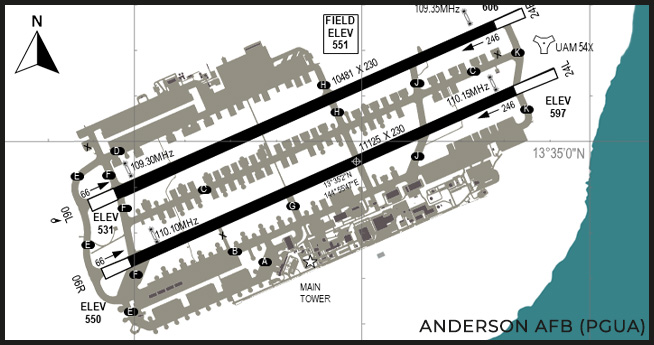
- When you are ready to taxi the first thing you need to do is call into Anderson Traffic and declare that you are taxing. Utilizing the Radio Communications procedures, transmit the following radio sequences on CTAF:
--145.00--

ANDERSON TRAFFIC, CHEVY 1-1 //
  TAXING TO RUNWAY "06R" VIA "CLARLIE" "FOXTROT" FOR DEPARTURE //
ANDERSON TRAFFIC //
- You may now begin taxing towards 06R - remember, if you have to cross any active runways - ensure you HOLD SHORT, double check there is no traffic inbound then proceed when safe to do so. Here is an example radio call when crossing a runway:
--145.00--

ANDERSON TRAFFIC, CHEVY 1-1 //
  CROSSING "06L" AT "FOXTROT" //
ANDERSON TRAFFIC //
- You may then continue on taxing down towards the button of 06R preparing to enter the runway.
- Double check that the runway, approach and depature are both clear and when safe to do so, declare your intentions:
--145.00--

ANDERSON TRAFFIC, CHEVY 1-1 //
  TAKING ACTIVE RUNWAY "06R" FOR DEPARTURE //
ANDERSON TRAFFIC //
- Once you complete your final safety checks, you are cleared to take off.
- Power up, and take off maintaining runway heading. Altitude is at your decretion, keep in mind there is a visual identification element to this check flight and broken cloud coverage starts at approximately 7,000' ASL, so choose your altitude wisely..
- When you reach 8 - 10 NM away from Anderson, check out of CTAF and check into Strike with forward controller FISH, radio sequence as follows:
--145.00--

ANDERSON TRAFFIC, CHEVY 1-1 //
  CLEAR OF YOUR AIRSPACE, SWITCHING TACTICAL //
ANDERSON TRAFFIC //
--351.50--

FISH, CHEVY 1-1 //
  CHECKING IN OUT OF ANDERSON //
  PROCEEDING AS FRAGGED //
- Once you have checked in with FISH, continue onto the next section of the check flight.
Navigation, Sight Seeing & Weapon Employment
Route
The navigation and sight seeing portion of the check flight is broken down into 4 seperate waypoints, taking you on a journey of approximately 200 NM. Take a look at the map:
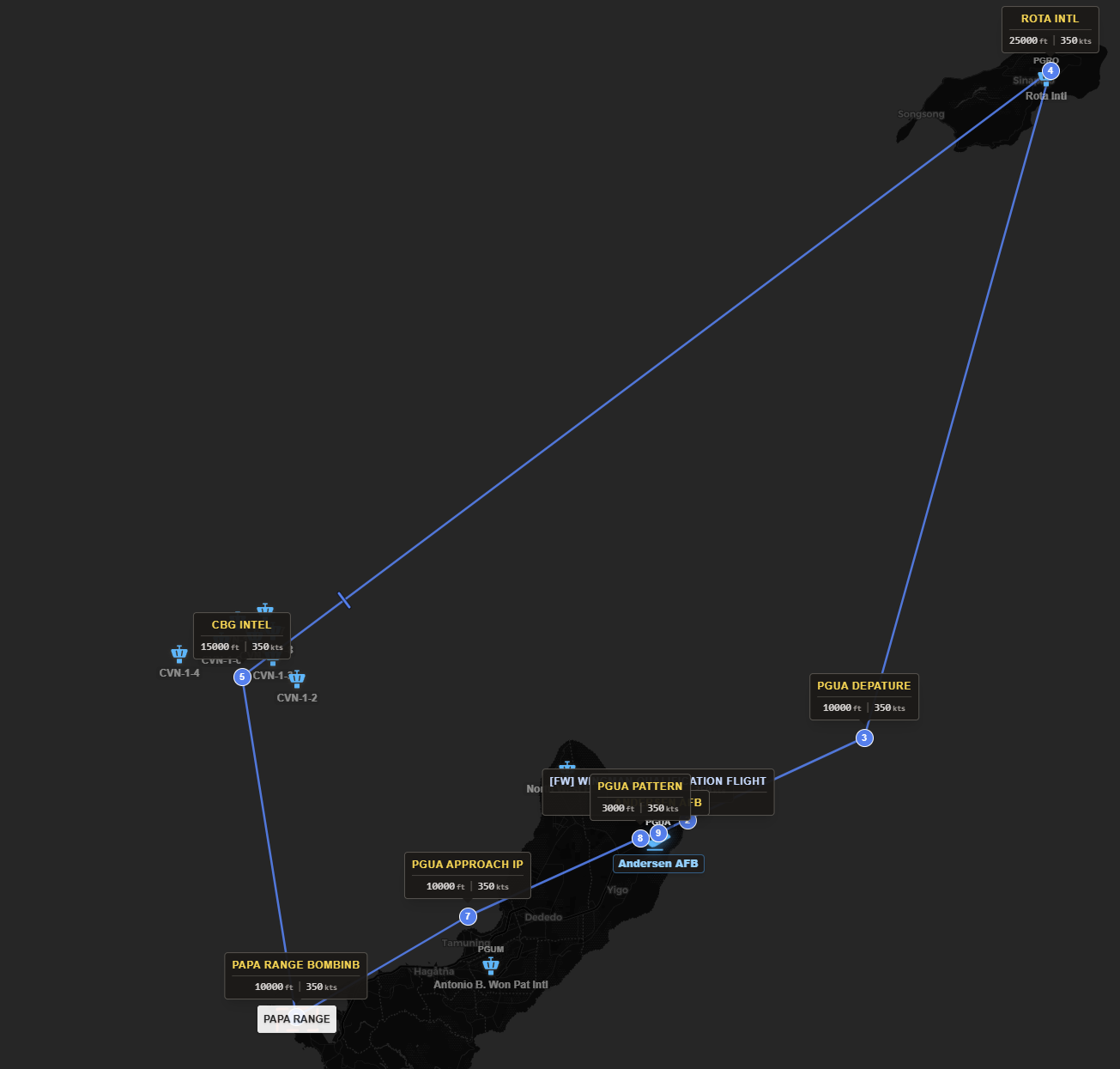
Flight Plan
You can find the complete flight plan with coordinates, etc... on our proprietary flight planning tool within the membership portal.
It is worth noting however that each aircraft has slightly different requirements - being combat employment, logistics usage, etc... so differ to the Squadron Leadership / Specialists for that airframe for confirmation.
During this phase - you will be following closely the directions of your training specialist / Squadron leadership. As each aircraft differs in capabiltiies - it is worth looking at the individual airframe wingman qualifications located on the membership portal within the S3 - Training / Qualifications zone.
Once complete, you will be returning to Anderson AFB, so report in and declare our intentions.
Landing Pattern
Welcome to Anderson AFB - first and foremost, lets check in with Anderson Traffic:
--145.00--

ANDERSON TRAFFIC, CHEVY 1-1 //
  CURRENTLY "10 NM" TO YOUR "WEST" //
  ENTERING LEFT OVERHEAD PATTERN FOR "06L" //
ANDERSON TRAFFIC //
For purpooses of the check flight, we will be using runway 06L as the active runway. As such, in keeping with our Airfield Operations, you will be conducting a left hand overhead pattern.
Take a look at the chart to familiarize yourself on the layout of the airfield:
As we mentioned at the end of Waypoint 4 - if you did everything right, once your done identifying the buildings at Waypoint 4 you should be on path for an overhead approach of runway 06L at Anderson.
Don't be fooled!
Antonio and Anderson airfields are fairly close together! Once you are done at Waypoint 4 you will be overflying Antonio before getting to Anderson... So don't get lost!
Touch and Goes
To be successful in your check flight, you must demonstrate the ability to conduct two (2) safe, touch and go approaches to 06L. Let's let the traffic pattern know we are commencing our landing procedures:
--145.00---

ANDERSON TRAFFIC, CHEVY 1-1 //
  UPWIND "06L" //
  COMMENCING LANDING, TOUCH AND GO, "06L" //
ANDERSON TRAFFIC //
Remembering our Airfield Operations, the main position where you change altitude in the pattern is the downwind - as such lets declare our intentions:
--145.00---

ANDERSON TRAFFIC, CHEVY 1-1 //
  DOWNWIND "06L" TOUCH AND GO //
ANDERSON TRAFFIC //
And throughout the landing pattern, make your calls:
--145.00---

ANDERSON TRAFFIC, CHEVY 1-1 //
  TURNING BASE FOR "06L" TOUCH AND GO //
ANDERSON TRAFFIC //
--145.00---

ANDERSON TRAFFIC, CHEVY 1-1 //
  ON FINAL "06L" TOUCH AND GO //
ANDERSON TRAFFIC //
--145.00---

ANDERSON TRAFFIC, CHEVY 1-1 //
  CLEAR "06L", RE-ENTERING LEFT PATTERN FOR "06L" TOUCH AND GO //
ANDERSON TRAFFIC //
Repeat that procedure one (1) more time, and once you have finished your second touch and go - reenter the pattern and continue onto the full stop landing.
Full Stop Landing
Not unlike the touch and go landings, you need to perform the full stop landing safely and conducting all necessary radio calls throughout. As with before, lets declare our intentions to Anderson Traffic:
--145.00---

ANDERSON TRAFFIC, CHEVY 1-1 //
  UPWIND "06L" //
  COMMENCING LANDING, FULL STOP, "06L" //
ANDERSON TRAFFIC //
Remembering our Airfield Operations, the main position where you change altitude in the pattern is the downwind - as such lets declare our intentions:
--145.00---

ANDERSON TRAFFIC, CHEVY 1-1 //
  DOWNWIND "06L" FULL STOP LANDING //
ANDERSON TRAFFIC //
And throughout the landing pattern, make your calls:
--145.00---

ANDERSON TRAFFIC, CHEVY 1-1 //
  TURNING BASE FOR "06L" FULL STOP LANDING //
ANDERSON TRAFFIC //
--145.00---

ANDERSON TRAFFIC, CHEVY 1-1 //
  ON FINAL "06L" FULL STOP LANDING//
ANDERSON TRAFFIC //
--145.00---

ANDERSON TRAFFIC, CHEVY 1-1 //
  CLEAR "06L" AT "HOTEL" TAXING TO PARKING //
ANDERSON TRAFFIC //
Once you have safely cleared the runway and taxi'd to the designated parking area, go ahead and shut down your jet. The debrief will likely happen while you are shutting down.
Conclusion
Once you have completed your check flight, your instructor will provide you some feedback as well as the much anticipated go / no-go decision. So long as they have no reservations, you will be assigned to a squadron based on the airframe you wish to fly the most and can immediately begin participating in more events within the task force.
Revisions
| # | Short Summary | Date of Approval |
|---|---|---|
| 0.0.3 | KB Updates for Wingman Qual | 24 Aug 26 |
| 0.0.2 | KB & Check Flight Procedure Update | 14 Jul 25 |
| 0.0.1 | Document Creation | 01 Dec 24 |